Maybe we can help?
Automatic reminders for surveys
1. Accessing Surveys
You must be an active CAMPUS user (subscribe here). Launch CAMPUS (log in here) and click the survey icon in the top menu bar: (or click here).
2. Create a survey
We explain in detail here how to create a survey.
3. Enable automatic reminders in the settings
In the configuration settings for a date-based survey, you’ll find the following option:
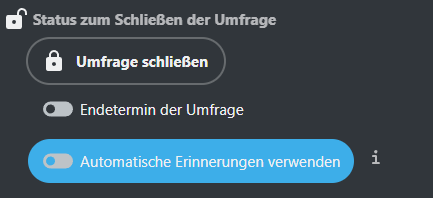
The automatic reminder is sent via email to all invitees:
1.For surveys with an expiration date:
– 48 hours before the expiration date, if the survey is created more than 5 days before the expiration date.
– 36 hours before the expiration date, if the survey is created more than 2 days but less than 5 days before the expiration date.
2.For date-based surveys without an expiration date:
– 48 hours before the first date option, if the survey is created more than 5 days before the first date option.
– 36 hours before the first date option, if the survey is created more than 2 and less than 5 days before the first date option.
3.No reminder is sent:
– For text-based surveys without an expiration date.
– For polls created less than 2 days before the expiration date.
– If a participant has already received a reminder (regardless of whether the expiration date has changed).
– If the poll is already closed.
