Wie können wir helfen?
Commands in Talk chat
1. Open talk
- You must be an active user (subscribe here) and have Talk included in your package (see overview here).
- Launch CAMPUS (Log in here) and
- click the Talk icon in the top menu bar:
 (or click here).
 (or
(or 2. Start a group chat
Your screen will then display a brief welcome message and, usually on the left side, an overview of your existing group chats:
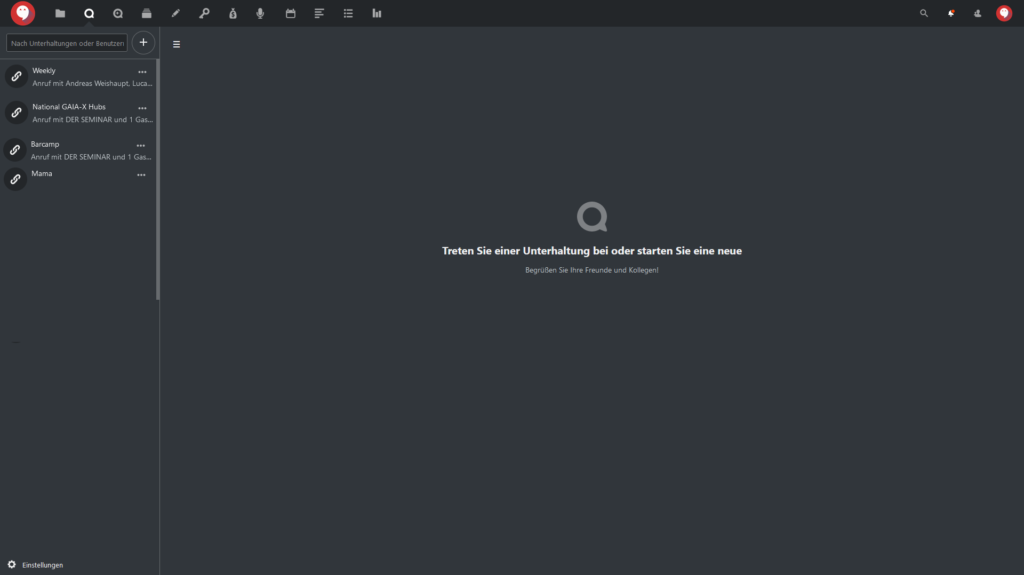
Click to enlarge
If the left menu bar is not displayed, click the ≡ icon. The bar will then appear. There, click on any existing chat or create a new group chat.
3. Chat in the group conversation
You can enter text in the chat window and add additional features.

The chat input window in DER SEMINAR Talk.
You can enter text in the central input field. The smiley icon allows you to enter emojis, and the paperclip icon opens additional input options:

Options for supplementing the chat input.
The chat in Talk can be expanded with the following options:
- Upload from device: Upload files from your own device
- Share from files: Embed files from the file storage in the CAMPUS Cloud
- New text file: Embed a simple MD text file
- New document: Embed a text file from the file storage and edit it via DER SEMINAR OnlyOffice
- New spreadsheet: Embed a spreadsheet file from the file storage and edit it via DER SEMINAR OnlyOffice
- New presentation: Embed a presentation file from the file storage and edit it via DER SEMINAR OnlyOffice
- Create new poll: Create and embed a poll for use in the chat.
Future updates may add additional features that provide new ways to enhance chats and messages
Tip:
You can also create events in the calendar and have a group chat created automatically for them. You can find the instructions here.
