< Alle Themen
Du bist hier:

Room Settings

How do I configure settings for a room?

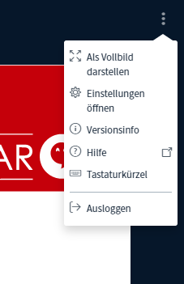
  • To adjust the settings for the conference room, click the three dots in the upper-right corner.
  • In addition to full-screen mode, settings, and a list of keyboard shortcuts, you’ll also find the option to leave the room here.
  • To do so, simply click “Log Out.”

You can find out how to adjust your personal settings here:

https://anhaltintelligence.com/help/persoenliche-einstellungen/?preview_id=23940&preview_nonce=fa8a64b99e&preview=true

Inhaltsverzeichnis
Privacy Overview

This website uses cookies so that we can provide you with the best user experience possible. Cookie information is stored in your browser and performs functions such as recognising you when you return to our website and helping our team to understand which sections of the website you find most interesting and useful.